PromethION 2 Solo – device and IT specifications


Requirements
PromethION 2 Solo – device and IT specifications
FOR RESEARCH USE ONLY.
Contents
Device model
Device and IT specifications
- 1. Overview
- 2. Technical specifications
- 3. Site-planning (pre-delivery)
- 4. Package contents
- 5. Physical installation
- 6. Data formats and analysis
- 7. Data handling and storage
- 8. Safety and compliance
Frequently asked questions
Appendix A: Shipment and logistics
Appendix B: Compatibility
Change log
Device model
PromethION 2 Solo (PRO-SEQ002)
Device and IT specifications
Overview
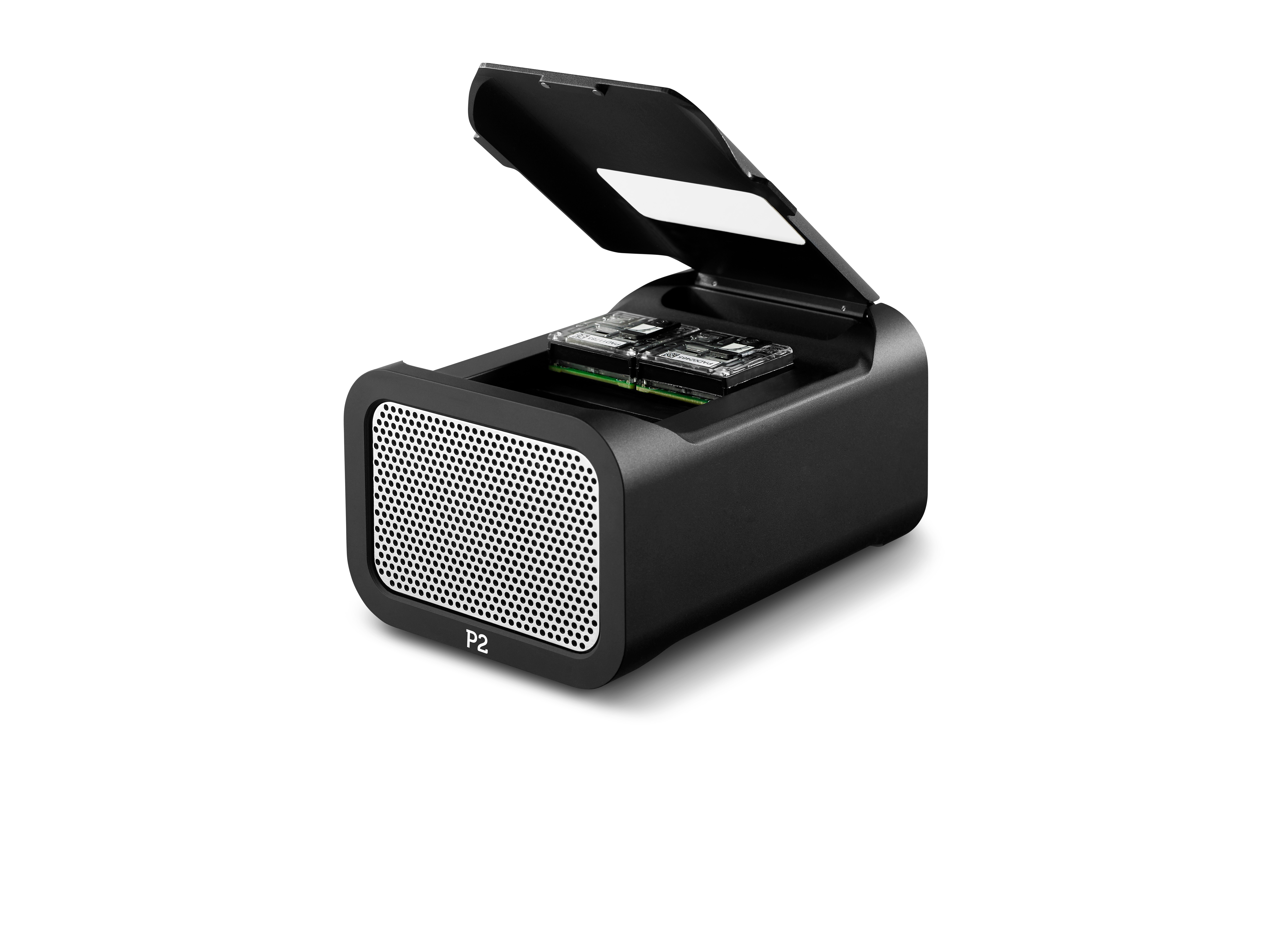
The PromethION™ 2 (P2) Solo is the smallest and most accessible product in the PromethION lineup. PromethION flow cells produce 6× more data than MinION™, making them ideal for larger genomes and high-plexity runs. The P2 Solo can run two flow cells simultaneously. For more information, click here.
The P2 Solo requires a computer with USB-C (USB 3.0+ speed) for power and sequencing control. GridION™ users can connect a P2 Solo to their sequencing device and use the GridION’s dedicated GPU and compute resources, or users can provide a compatible high-performance workstation.
Due to the large data volumes generated by the P2 Solo, selecting a suitably powerful computer is crucial. If you require an all-in-one solution with integrated compute and optimised performance, we recommend the P2 Integrated, which includes state-of-the-art computational hardware.
For more details on P2 Integrated, click here.
Technical specifications
| Component | Specification |
|---|---|
| Size and Weight | H 87 × W 110 × D 152 mm; 1.5 kg |
| Maximum rated power | 60 W |
| Installation ports | 1 × USB Type-C (3.0 at 5 Gbps) 1 x 12 VDC barrel power connector |
| Software installed | P2 Solo device driver |
| Sequencing temperature | Designed for sequencing at environmental temperatures of +18°C to +25°C* |
| Heat output | 205 BTU/hr maximum |
| Installation requirement | Maintain a minimum 30 cm clearance on all sides except the base. Do not place the device near heat sources. |
Site-planning (pre-delivery)
Using a GridION
The P2 Solo can use a GridION Mk1 as a plug-and-play compute resource, taking advantage of its integrated GPU for basecalling.
Out-of-the-box compatibility: The GridION’s operating system, SSD, and memory are fully optimised for sequencing with the P2 Solo.
Required GridION model: A GridION Mk1 with serial number GXB02xxx or higher is required to run all basecalling models with a PromethION Flow Cell.
For additional GridION-specific IT requirements, including network access and power requirements, click here.
Host computer requirements
Selecting the right computer for P2 Solo is critical due to its higher data throughput.
The specifications below ensure your computer can efficiently acquire data and perform basecalling. Using an unsupported computer may lead to reduced performance, slower basecalling, or failed runs.
| Component | Recommended |
|---|---|
| Operating system | Windows 10/11 Ubuntu 22.04/24.04 LTS |
| CPU | Intel i7+ (12-cores+) |
| GPU | Desktop Nvidia 5090 RTX / RTX PRO 6000 Blackwell Workstation Edition / A100 |
| Memory | 64 GB+ |
| Storage | 8 TB SSD + Note: If using multiple physical SSDs, they need to appear as a single drive to the OS using RAID 0. Using other configurations or including non-SSDs into the RAID 0 can cause performance issues. |
| Peripheral | USB Type-C (USB 3.0 speeds or higher) Monitor 1 (1920 x 1080) |
Note: Compatibility and performance on computers with multiple GPUs and/or newly released hardware, such as next-generation GPUs or processors, may be limited until testing and optimisation are complete.
Processor compatibility
- MinKNOW is only supported on modern Intel, AMD, and Apple Silicon processors.
- Ensure your CPU supports AVX-2 (Intel Haswell, AMD Steamroller, or newer).
- Intel-based Macs are not supported.
- Other processors, such as Qualcomm Snapdragon or other ARM-based chips, are not supported.
Laptop suitability
NVIDIA offers graphics cards in both desktop and mobile (laptop) formats. While laptops provide portability, desktop cards typically offer better performance, power efficiency, and thermal management.
For compute-intensive tasks, desktops are generally more suitable, as laptops may struggle with sustained workloads.
Example computers
Here is a non-exhaustive list of example computers that can be configured to meet the provided specifications:
- Tuxedo Atlas XL | Linux
- System 76 Thelio | Linux
- Alienware Aurora 16 | Windows
- Puget Workstation | Windows
Note: Oxford Nanopore is not affiliated with these suppliers and has not extensively tested these computers. Please ensure the configuration meets the specifications above before purchase.
Network and connectivity requirements
USB connectivity
The P2 Solo is designed to be connected via USB-C, and must be connected directly into the workstation computer's motherboard using the USB Type-C cable (~1 m) provided with the device.
Not supported:
- PCIe to USB-C adapter cards (known to cause communication errors).
- USB hubs or docking stations (may impact performance)
If your workstation lacks a USB-C port on the motherboard, a USB-C to USB-A cable can be provided. This USB-A port must support USB 3.0 speeds or higher.
Required domains
The table below outlines the domains that must be accessible for specific system functions:
| Access type | Purpose | Required domains |
|---|---|---|
| Telemetry | Enables MinKNOW to run and communicate telemetry | ping.oxfordnanoportal.com |
| Software and OS updates | Access to MinKNOW updates, OS packages, and GPU drivers | cdn.oxfordnanoportal.com*.ubuntu.com*.nvidia.com |
| EPI2ME™ Labs | Access for container-based analysis workflows | *.github.comhub.docker.com |
| Nanopore account login | To log in to your Nanopore account to access cloud services | id.nanoporetech.com*.okta.com |
If your institution uses a proxy or firewall, configure it to allow outbound access to these domains to ensure software functionality, updates, and user authentication.
Telemetry
MinKNOW and EPI2ME collect telemetry data during use as outlined in our Terms and Conditions. This helps monitor device performance, supports troubleshooting, and enables flow cell warranty replacement where applicable.
Privacy note: Some telemetry fields allow free-text entry. Avoid entering personally identifiable information in these fields. We do not collect sequence data.
Other system considerations
System behaviours such as scheduled updates, antivirus scans, or managed IT policies can interfere with sequencing runs.
Below are some key areas to review and discuss with your IT department to ensure a smooth and uninterrupted sequencing experience.
| Component | Minimum requirement |
|---|---|
| Electrical | Plug both the P2 Solo and the connected computer directly into wall power sockets. Do not use extension cords or power strips, as these can introduce electrical instability. |
| User account privilege level | Local Administrator privileges are required for installation and updates. They are not required for running sequencing experiments. |
| Internet connection | A stable internet connection is required at all times for software updates and telemetry. For offline use (e.g., fieldwork, expeditions), contact support@nanoporetech.com for guidance. |
| Antivirus settings | Antivirus software can consume significant system resources, potentially affecting sequencing performance. To avoid disruptions, we recommend disabling automatic scans and scheduling manual scans when the P2 Solo is not in use. |
| Endpoint Detection software | Endpoint detection software may interfere with system performance. We recommend disabling such software during sequencing. If your IT policies require third-party endpoint protection, please ensure that relevant codes are whitelisted in the software’s peripheral control settings. Users are responsible for validating that these settings do not affect P2 Solo performance. For more information please visit: How do I connect my P2 Solo? |
| BIOS/Chipset Settings & Updates | Ensure your BIOS firmware and chipset drivers are up to date. For EPI2ME analysis, ensure virtualisation is enabled. |
| OS update settings | Set OS updates to manual mode, as updates downloading during a sequencing run may cause issues. Updates requiring a restart will halt an active run. Please coordinate with your IT department to ensure that Group Policies do not override local settings in a way that could cause unplanned updates or restarts. |
Package contents
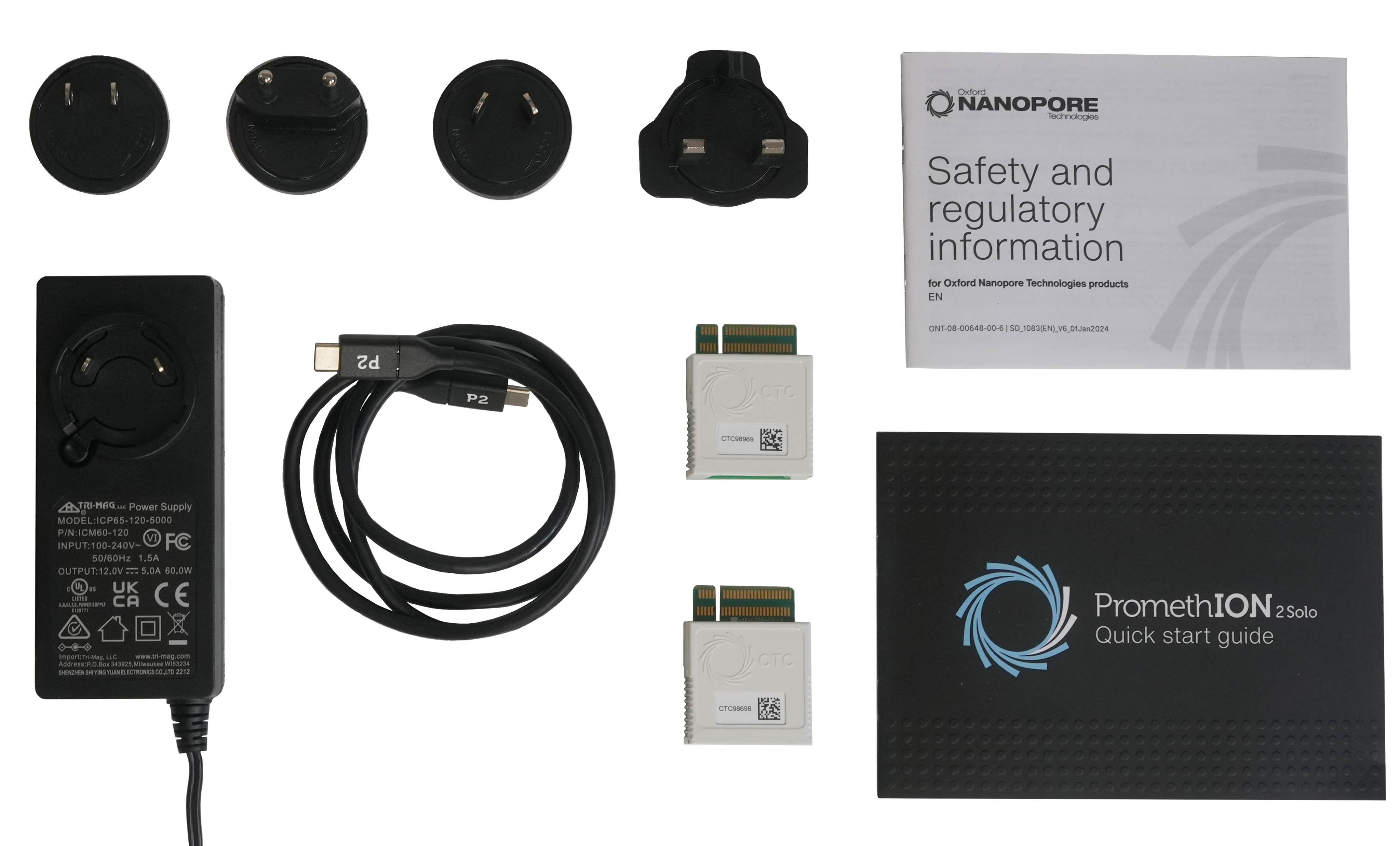
| Quantity | Item | Function |
|---|---|---|
| 1 | PromethION 2 Solo | DNA/RNA sequencing instrument |
| 2 | Configuration test cell (CTC) | Used to verify sequencing hardware functionality (1 per flow cell position) |
| 1 | USB-C to USB-C cable (1.0 m) | Connects the PromethION 2 Solo to the host computer for data transfer and control |
| 1 | 60 W power adapter | Provides DC power supply to the PromethION 2 Solo |
| 1 | Quick start guide | Overview of system setup |
| 1 | Safety and regulatory document | Safety information and regulatory compliance details |
| 1 1 1 1 | UK (Type G → C13) 2 m 10 A 250 VAC mains power cord EU (Schuko Type C → C13) 2 m 10 A 250 VAC mains power cord USA (Type B → C13) 2 m 15 A 125 VAC mains power cord Australia (Type I → C13) 2 m 10 A 250 VAC mains power cord | Region-specific power supply cables |
Physical installation
- Allow at least 30 cm clearance at the front, rear and sides of each unit to ensure adequate ventilation and access.
- Do not place the device on top of a laptop/computer, and keep it away from active heat sources
Data formats and analysis
File types
The system stores nanopore sequencing data in the following file types:
- FASTQ - A text-based format that stores DNA/RNA sequences and quality scores
- BAM - A format for aligned reads, including modified base calls (e.g., methylation)
sequencing_summary.txt- Contains metadata for all basecalled reads from a sequencing run. This includes details such as read ID, sequence length, per-read Q-score, and read duration. The size of a sequence summary file will depend on the number of reads sequenced
Optional:
- POD5 - The primary raw data format, replacing the legacy .fast5. It is more efficient in both storage and processing
The table below provides estimated storage requirements based on different sequencing throughputs from a single flow cell. These values assume a run that saves POD5, FASTQ, and BAM files, with a read N50 of 23 kb.
| Flow cell output (Gbases) | FASTQ.gz storage (Gbytes) | Unaligned BAM with modifications (Gbytes) | (Optional) POD5 storage (Gbytes) |
|---|---|---|---|
| 100 | 65 | 60 | 700 |
| 200 | 130 | 120 | 1,400 |
Note: When basecalling is turned on, the system will create FASTQ and/or BAM files, and will require additional temporary storage while the sequencing run is active. If you elect to turn on POD5 output, the system will generate POD5 files continuously during the experiment.
EPI2ME analysis
The EPI2ME Desktop Application provides user-defined local or cloud-based analysis solutions:
- Local analysis runs directly on the user’s computer, using available compute resources
- The cloud-based analysis runs on Amazon Web Services (AWS) and requires an internet connection
Find out more about how EPI2ME can support your data analysis needs here.
Data upload formats: EPI2ME receives FASTQ, BAM, and other relevant workflow formats, processes data via custom Nextflow pipelines, and provides interactive HTML reports.
Software updates
You can download updates via the MinKNOW interface or terminal (using apt). The system only requires outbound access. We share notifications about software updates through the Nanopore Community and provide full update instructions in each release note.
Data handling and storage
Data transfer
If using a P2 Solo with a GridION and requiring additional SSD storage, ensure you are using the correct USB/Ethernet connections for optimal performance.
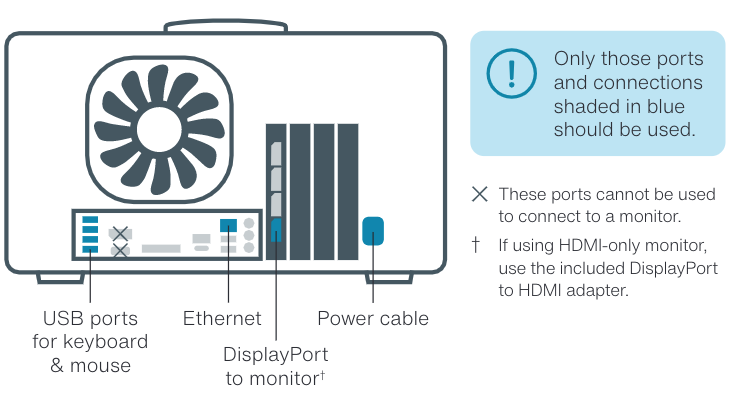
- Use the blue USB Type-A ports on the rear of the GridION (see image above).
- If using Ethernet, use a CAT5e or higher cable (1 Gbps minimum) and keep the cable as short as possible to reduce latency.
Do NOT use:
- The USB port with a white rectangular centre
- Any front-facing USB ports (if your GridION has them)
Safety and compliance
Device identification
Device part number:
PRO-SEQ002 - PromethION 2 Solo
Intended use
Oxford Nanopore Technologies PromethION 2 Solo device is an electronic analysis system for use in scientific research. Its core technology uses a nanopore to detect single-molecule events, including nucleic acids (DNA/RNA), proteins, and small molecules.
This product is for research use only.
Safety information
Before use, review the following safety guidelines:
- Maintain 30 cm clearance to all but the bottom face of the device.
- Do not place the device on top of a laptop/computer and keep away from active heat sources
Emergency procedures
In case of an emergency, switch the P2 Solo off at the power switch and unplug the USB-C cable.
Declaration of conformity
The PromethION 2 Solo complies with relevant EMC and Electrical Safety directives, as outlined in the EC Declaration of Conformity below.
Declaration of conformity for the PromethION 2 Solo
Compliance labels
International standards
The PromethION 2 Solo is certified to the following international standards:
| Certification | Country |
|---|---|
| MET; UL61010/CSA-C22.2 No. 61010, third Edition: Electrical Equipment for Measurement, Control and Laboratory Use, Revision: May 11, 2012 | USA and Canada |
| FCC | USA |
| RCM compliance | Australia and New Zealand |
| ISC Safety Compliance | Cambodia |
| UAE RoHS | UAE |
| NRCS and SABS | South Africa |
| EAC | Customs Union of the Eurasian Economic Union |
License and warranty
The license and warranty contract ensure your instrument performs optimally by providing the latest up-to-date hardware and software. Oxford Nanopore Technologies guarantees the delivery of its support obligations during the contract period, as laid out in sections 4 and 7 of the Nanopore Product Terms and Conditions.
For more information on device warranty, visit this page on the Oxford Nanopore Store.
Frequently asked questions
Can I use a computer that differs from or is older than the specifications listed here?
Yes, but performance—especially basecalling speed—may vary depending on hardware. The choice of GPU has the greatest impact on performance.
Hardware compatibility:
- Computers released before 2015 are unlikely to work.
- Ensure your GPU supports CUDA 6.1+ (RTX 10XX series or newer).
- Ensure your CPU supports AVX-2 (Intel Haswell, AMD Steamroller, or newer).
- A USB-C port (USB 3.0 or higher) is required for device connection.
Newer hardware:
- Compatibility and performance on newly released hardware—such as next-generation GPUs or processors—may be limited until testing and optimisation are complete.
I bought a computer based on a previous version of this document, is it now obsolete?
This document is intended to guide users who are purchasing a new computer for use with the P2 Solo. As hardware availability changes over time, we update our recommendations to reflect current, readily available components. If your existing computer still meets the specifications listed in the question above, it remains compatible with our software.
I want to basecall my data on another computer / HPC, and want a true minimum specification for data acquisition only.
For data acquisition only (sequencing without any basecalling), the minimum specification - excluding the GPU - is sufficient.
Can I use Linux distributions other than Ubuntu 22.04/24.04 LTS?
We recommend using only Ubuntu 22.04 or 24.04 LTS. Other Linux distributions are not tested or validated and may not be compatible with our software or support processes.
Why isn’t there a recommended Mac specification?
While Apple Silicon is supported, sequencing performance is better on systems with NVIDIA GPUs, which also offer a more favourable price-to-performance ratio for basecalling. If using a computer powered by Apple Silicon, we only recommend use of fast basecalling, as larger models will take significant time to run and are not capable of keeping up with flow cell output.Support
For more information and FAQs for the PromethION 2 Solo, refer to the P2 Solo self-service page.
Appendix A: Shipment and logistics
The Oxford Nanopore Technologies P2 Solo device is stored and shipped at ambient temperature (+2°C to +25°C).
Please note that the P2 Solo is shipped separately from the kits and flow cells in the Starter Pack.
Appendix B: Compatibility
The PromethION 2 Solo is compatible with all the latest versions of chemistry for PromethION Flow Cells, sequencing kits, and expansions.
This includes compatibility with:
- Flow Cells: PromethION R10 Series Flow Cell (FLO-PRO114M)
RNA004 PromethION Flow Cell (FLO-PRO004RA) - Sequencing kits: The PromethION 2 Solo is compatible with all V14 chemistry kits: ligation, rapid, barcoding, PCR, cDNA, and Direct RNA kits. We have not tested the following:
- Ultra-Long DNA Sequencing Kit V14 (SQK-ULK114)
- Rapid Barcoding Kit 24 V14 (SQK-RBK114.24/96)
- Rapid Sequencing Kit V14 (SQK-RAD114)
- 16S Barcoding Kit 1-24 (SQK-16S114.24)
- Assembly Polishing Kit (SQK-APK114)
- Latest sequencing software: MinKNOW, Dorado Basecall Server
- Downstream analysis tools: EPI2ME (and included workflows), Oxford Nanopore pipelines (MinKNOW-compatible workflows), and custom-developed tools (Nanopore Community developed tools)
Change log
| Date | Version | Changes made |
|---|---|---|
| 20 Jul 2026 | V3 | The SSD RAID requirement was included in storage component in the Table under 'Site-planning (pre-delivery)', 'Host computer requirements'. And the Note under this Table was updated. |
| 13 Jan 2026 | V2 | In section 3, Site planning (pre-delivery), subsection Network and connectivity requirements, the subsections Required domains and Telemetry have been added. |
| 7 Jan 2026 | V1 | This document consolidates the PromethION 2 Solo Technical Specifications and the PromethION 2 Solo IT Requirements into a single document. The previous documents are now in legacy. What’s new: - Combined the two documents and reorganised the overall structure. - Made the compatibility section easier to read: instead of lists of kit codes, it now provides a simple statement about which kits and software are compatible, along with notes on any exceptions. - Added details of package contents - Added a new subsection under section 3 (Other system considerations) and another under section 8 (International standards). |