GridION Mk1 – device and IT specifications


Requirements
GridION Mk1 – device and IT specifications
FOR RESEARCH USE ONLY.
Contents
Device and IT specifications
- 1. Overview
- 2. Technical specifications
- 3. Site-planning (pre-delivery)
- 4. Package contents
- 5. Physical installation
- 6. Data formats and analysis
- 7. Data handling and storage
- 8. Safety and compliance
Frequently asked questions
Appendix A: Shipment and logistics
Appendix B: Compatibility
Change log
Device model
GridION Mk1 (GRD-MK1 or GRD-X5B003)
Device and IT specifications
Overview
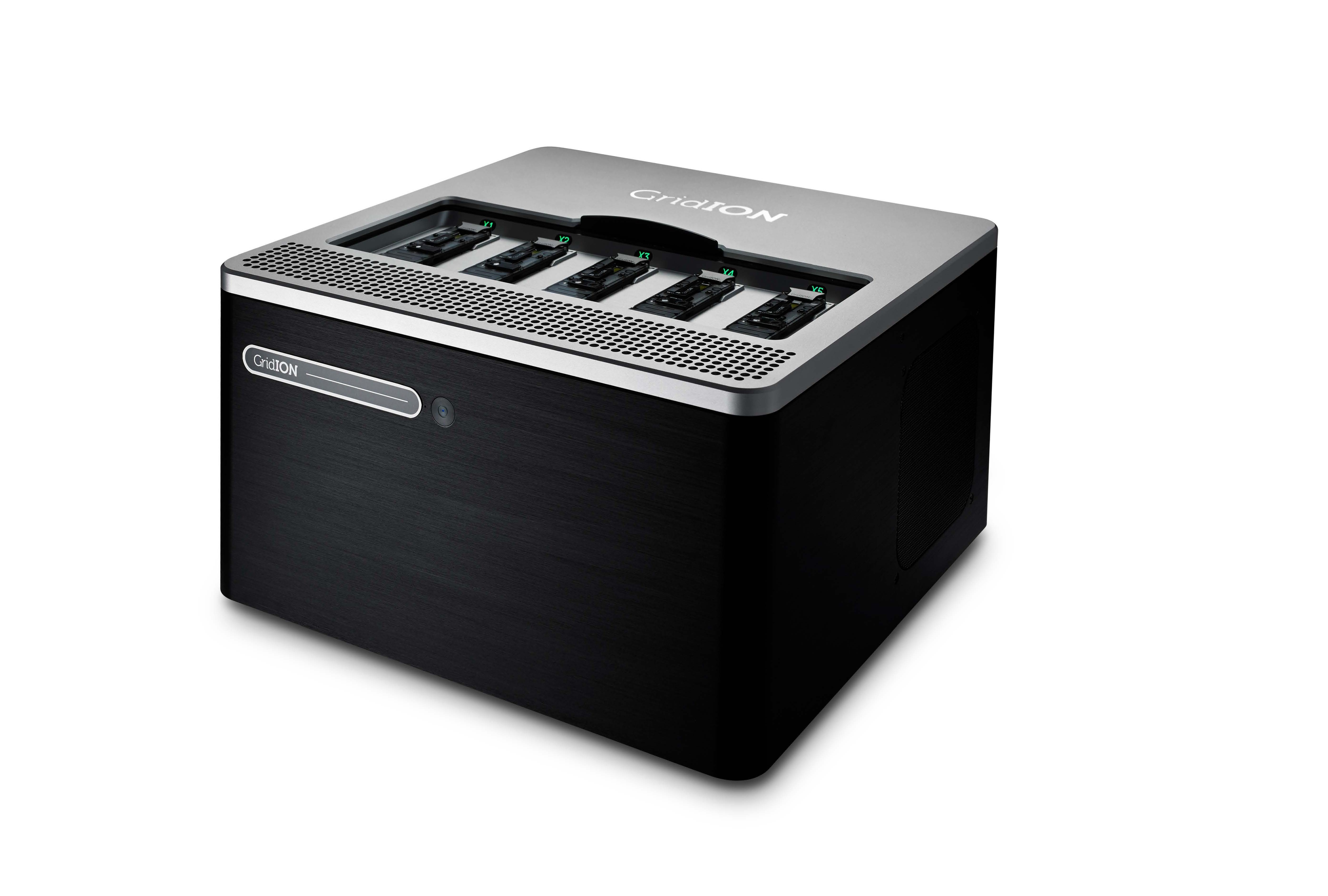
The GridION™ is a benchtop sequencing device that can run and analyse up to five MinION™ or Flongle™ Flow Cells simultaneously, or a combination thereof. It is ideal for labs working across multiple projects that would benefit from the key advantages of nanopore sequencing, including:
- Simple library preparation
- Real-time data acquisition and analysis
- Biological insights from reads of any length
The GridION features integrated compute, which enables data acquisition, analysis, and feedback, basecalling, data streaming, and device control, all without relying on external IT infrastructure. This reduces the need for additional setup and simplifies deployment.
Oxford Nanopore Technologies provides custom, pre-installed software to manage the entire sequencing process on the GridION.
Technical specifications
| Component | Specification |
|---|---|
| Operating system | Ubuntu Focal (20.04) / Ubuntu Noble (24.04) |
| Storage | 7 TB internal SSD (GRD-MK1 devices with serial numbers below GXB05000 have 4 TB SSD storage) |
| GPU | 1 x NVIDIA GV100 |
| Memory | 64 GB RAM |
| Connectivity | 1 x 2.5 Gbps Ethernet (RJ45 connector) 4 x USB 3.0 Type-A ports (up to 10 Gb/s) 1 X Display Port 1 X HDMI 2.0 Port (up to 4K resolution at 60 Hz) 1 X 3.5 mm audio output |
| Size and Weight | H 220 x W 365 x D 370 mm; 14.4 kg |
| Environmental range | Operating: +18°C to +25°C Functional: +5°C to +40°C |
| Heat output | 2220 BTU/h maximum |
| Power | 100-240 VAC (50/60 Hz) Maximum power consumption: 650 W Plug type: 1 x C13 input |
Site-planning (pre-delivery)
Installation checklist
This checklist outlines the minimum IT and infrastructure requirements for installing the GridION Mk1 at your institution. For a complete explanation of each item, refer to the sections that follow.
| Item/setup required | Purpose |
|---|---|
| 1 x 1 Gbps ethernet port with DHCP or static IP | Connection to IT infrastructure and internet |
| 1 x 1 Gbps ethernet cable | Connection to IT infrastructure and internet |
| Wired USB mouse and keyboard | Device control |
| HDMI or DisplayPort (DP) compatible monitor Recommended screen resolution: 1920 x 1080 px | Device control |
| 1 x 100–240 VAC (50/60 Hz) outlet | Device power |
| Uninterruptible power supply (optional: see below for details) | Power stability |
| Storage: Sufficient infrastructure for required storage option* | Long-term data storage |
*Size of storage required will depend on use case. Please refer to the information below for storage guidelines.
Power and UPS requirements
Power reliability is essential for protecting sequencing runs and ensuring stable operation. We strongly recommend using Uninterruptible Power Supplies (UPS) to protect both the GridION Mk1 and any attached display.
Why use a UPS?
A UPS provides backup power and voltage regulation. In the event of a power cut or fluctuation, it can:
- Keep the system running for several minutes
- Trigger alerts that allow sequencing runs to be paused or safely shut down
- Help prevent issues caused by unstable or poor-quality mains power
Recommended UPS specifications
The best option will depend on your site setup, including space, power access, and budget. We recommend consulting your facilities team and/or a qualified electrician to determine the most suitable configuration for your environment.
| Parameter | Minimum requirement |
|---|---|
| Power rating | 1.5 kVA |
| UPS type | Online / double conversion |
| Transition time | <5 ms |
| Battery runtime | ≥ 5 min (to allow safe shutdown or generator switch-over) |
| Output type | Pure sine-wave |
| Output voltage | 200–240 VAC at 50/60 Hz |
| Power Cables | Ensure cables are rated to a minimum of 10 A 250 VAC, and compatible with the C13 input of the GridION |
You will need to provide your own UPS. Oxford Nanopore Technologies does not validate or supply specific models. Selection, installation and maintenance are your responsibility.
Recommended power management practices
While The GridION is engineered for robustness and uptime, we recommend powering it down when not in use for extended periods (e.g. over weekends, or between experimental runs). This is a good practice for:
- Reducing energy consumption: small changes across labs and institutions can contribute to large environmental gains.
- Extending hardware lifespan: reducing continuous power draw limits heat stress and component fatigue.
- Avoiding unnecessary wear: solid-state drives, fans, and power supplies all benefit from idle periods.
For optimum performance, we recommend performing a full power cycle at least once a month. Best practice power cycle:
- Shut down the device using the standard software shutdown process.
- Switch off power at the wall or unplug the device entirely.
- Wait at least 60 seconds to allow all internal components (e.g. capacitors) to fully discharge.
- Reconnect power and turn the device back on.
Installation readiness
UPS systems must support your region’s voltage, plug type, and circuit protection
Follow the installation instructions your UPS manufacturer provides, and consult a qualified electrician where appropriate
Train relevant staff on safe shutdown procedures
Where possible, install the UPS ahead of system delivery to avoid delays
Oxford Nanopore Technologies does not cover customer-supplied UPS devices under its support plans
Network and connectivity requirements
Before installing the device, you will need 1 × Ethernet cable (Cat5e or higher) and network access that provides either a DHCP-assigned or statically configured IP address.
Network access requirements
The system uses outbound-only connections over TCP ports 80 and 443 and does not require any inbound access.
Oxford Nanopore Technologies does not have remote access to your system.
Required domains
The table below outlines the domains that must be accessible for specific system functions:
| Access type | Purpose | Required domains |
|---|---|---|
| Device operation and telemetry | Enables MinKNOW to run and communicate telemetry | id.customers.nanoporetech.comping.oxfordnanoportal.com |
| Software and OS updates | Access to MinKNOW updates, OS packages, and GPU drivers | cdn.oxfordnanoportal.com*.ubuntu.com*.nvidia.com *.canonical.com |
| EPI2ME™ Labs | Access for container-based analysis workflows | *.github.comhub.docker.com |
| Nanopore account login | To log in to your Nanopore account to access cloud services | id.nanoporetech.com*.okta.com |
If your institution uses a proxy or firewall, configure it to allow outbound access to these domains to ensure software functionality, updates, and user authentication.
Telemetry
MinKNOW and EPI2ME collect telemetry data during use as outlined in our Terms and Conditions. This helps monitor device performance, supports troubleshooting, and enables flow cell warranty replacement where applicable.
Privacy note: Some telemetry fields allow free-text entry. Avoid entering personally identifiable information in these fields. We do not collect sequence data.
Package contents
| Quantity | Item | Function |
|---|---|---|
| 1 | GridION Mk1 | DNA/RNA sequencing instrument |
| 1 | DisplayPort to HDMI Adapter | Connect the device to an external monitor |
| 5 | Configuration test cell (CTC) | Used to verify sequencing hardware functionality (1 per position) |
| 1 | Quick start guide | Overview of system setup |
| 1 | Safety and regulatory documentation | Covers safe use and regulatory compliance |
| 1 1 1 1 1 | UK (Type G → C13) 2 m 10 A 250 VAC mains power cord EU (Schuko Type C → C13) 2 m 10 A 250 VAC mains power cord USA (Type B → C13) 2 m 15 A 125 VAC mains power cord China (Type I → C13) 2 m 10 A 250 VAC mains power cord Australia (Type I → C13) 2 m 10 A 250 VAC mains power cord | Region-specific power supply cables |
Physical installation
Connection from the UPS to the GridION Mk1 must use appropriately rated cables (10 A 250 VAC)
Schedule regular UPS maintenance to ensure continued protection
Data formats and analysis
File types
The system stores nanopore sequencing data in the following file types:
FASTQ - A text-based format that stores DNA/RNA sequences and quality scores
BAM - A format for aligned reads, including modified base calls (e.g., methylation)
sequencing_summary.txt - Contains metadata for all basecalled reads from a sequencing run. This includes details such as read ID, sequence length, per-read Q-score, and read duration. The size of a sequence summary file will depend on the number of reads sequenced
Optional:
POD5 - The primary raw data format, replacing the legacy .fast5. It is more efficient in both storage and processing
The table below provides estimated storage requirements based on different sequencing throughputs from a single flow cell. These values assume a run that saves POD5, FASTQ, and BAM files, with a read N50 of 23 kb.
| Flow cell output (Gbases) | POD5 storage (Gbytes) | FASTQ.gz storage (Gbytes) | Unaligned BAM with modifications (Gbytes) |
|---|---|---|---|
| 10 | 70 | 6.5 | 6 |
| 15 | 105 | 9.75 | 9 |
| 30 | 210 | 19.5 | 18 |
Note: When basecalling is turned on, the system will create FASTQ and/or BAM files, and will require additional temporary storage while the sequencing run is active. If you elect to turn on POD5 output, the system will generate POD5 files continuously during the experiment.
EPI2ME analysis
The EPI2ME Desktop Application provides user-defined local or cloud-based analysis solutions:
Local analysis runs directly on the user’s computer, using available compute resources
The cloud-based analysis runs on Amazon Web Services (AWS) and requires an internet connection
Find out more about how EPI2ME can support your data analysis needs here. Data upload formats: EPI2ME receives FASTQ, BAM, and other relevant workflow formats, processes data via custom Nextflow pipelines, and provides interactive HTML reports.
Software updates
You can download updates via the MinKNOW interface or terminal (using apt). The system only requires outbound access.
We share notifications about software updates through the Nanopore Community and provide full update instructions in each release note.
Data handling and storage
Data transfer
The GridION Mk1 has sufficient SSD disk space for multiple sequencing experiments, storing POD5, FASTQ, and BAM data. However, it is imperative to clear this data store regularly to prevent successive runs from terminating due to a lack of storage space. For this, a site must provide storage to transfer data off the device.
The GridION runs on Ubuntu and supports mounting multiple file system types. We recommend using storage presented as NFS or CIFS. The form and volume of data you store will depend on your requirements:
You can choose to store POD5 files with raw read data or delete them. If you wish to rebasecall your data at a future date, you can optionally save raw POD5 files as a toggle in MinKNOW.
Retaining only FASTQ/BAM files will allow the use of standard downstream analysis tools using the DNA/RNA sequence.
Estimated transfer times
The table below provides approximate transfer times for different flow cell configurations using 1 Gbps and 2.5 Gbps connections.
| Flow cell configuration | 1 Gbps transfer time | 2.5 Gbps transfer time |
|---|---|---|
| 1 × 30 Gbase flow cell | ~1 h | ~0.5 h |
| 5 × 30 Gbase flow cell | ~5 h | ~2 h |
| 2 × 200 Gbase flow cells | ~14 h | ~6 h |
Use this information to assess your site’s bandwidth requirements and plan infrastructure accordingly.
Storage recommendations
To ensure stable data handling and long-term accessibility, consider the following storage strategies:
Short-term storage Use SSD-based networked storage (e.g., NFS or CIFS) for high-speed streaming during active sequencing runs
Long-term archiving After sequencing, you can store the data on slower, cost-effective archival storage solutions
File format considerations
Store POD5 files if you plan to re-basecall the data later or use tools requiring raw signal data access
Store FASTQ files for downstream analysis if you don’t need to reprocess raw data
Oxford Nanopore Technologies does not prescribe specific storage volumes or architectures, as these requirements vary by site. We recommend working with your local IT team to define:
Real-time data streaming infrastructure
Short-term high-speed storage
Long-term archival capacity
Safety and compliance
Device identification
Device part numbers:
GRD-MK1 or GRD-X5B003 - GridION Mk1
Intended use
The GridION is an electronic analysis platform designed for use in scientific research. Its core technology uses a nanopore to detect single-molecule events, including nucleic acids (DNA/RNA), proteins, and small molecules.
This product is for research use only.
Safety information
Before use, review the following safety guidelines:
- Install the system on a stable surface with adequate ventilation
- Allow 30 cm clearance to the front, rear and sides of the device
- Ensure the environment is dust-free, and located away from open windows
Emergency procedures
In the event of an emergency:
Switch off the GridION device using the power switch
Unplug all power cables from the rear of the device
Declaration of conformity
The GridION Mk1 complies with relevant EMC and Electrical Safety directives, as outlined in the below EC Declaration of Conformity.
Declaration of Conformity for the GridION Mk1
Compliance labels
Labels on the GridION Mk1:
GridION Mk1 compliance label 1
GridION Mk1 compliance label 2
License and warranty
The license and warranty contract ensure your instrument performs optimally by providing the latest up-to-date hardware and software. Oxford Nanopore Technologies guarantees the delivery of its support obligations during the contract period, as laid out in sections 4 and 7 of the Nanopore Product Terms and Conditions.
More information on device warranty is available in the Oxford Nanopore Store.
Frequently asked questions
Do you have any recommendations for how to move data off the GridION in real time during a sequencing run?
Currently we recommend moving the data off the box using rsync run hourly through crontab. For further details, please email support@nanoporetech.com.
Appendix A: Shipment and logistics
Oxford Nanopore Technologies ships GridION devices in protective packaging. If you notice any damage to the boxes or signs of mishandling, refuse the delivery and notify Customer Service at support@nanoporetech.com.
We store and ship all systems at ambient temperature (+15˚C to +25˚C).
Please note that the GridION Mk1 is shipped separately from the kits and flow cells.
Shipping container specifications
| Shipping container weight, kg | Shipping container size (H x W x D) |
|---|---|
| 15 | 29 x 48 x 48 cm |
Appendix B: Compatibility
The GridION Mk1 is compatible with all the latest versions of chemistry for MinION/GridION Flow Cells, sequencing kits, and expansions.
This includes compatibility with:
Flow Cells:
- MinION and GridION R10 Series Flow Cell (FLO-MIN114)
- Flongle R10 Series Flow Cell (FLO-FLG114)
- RNA004 MinION Flow Cell (FLO-MIN004RA)
Sequencing kits: The GridION is compatible with all V14 chemistry kits, including ligation, rapid, barcoding, PCR, cDNA, and Direct RNA kits. We have not tested the following:
- Multiplex Ligation Sequencing Kit V14 (SQK-MLK114.96-XL)
- RNA Sequencing Kit XL (SQK-RNA004-XL)
Latest sequencing software: MinKNOW, Dorado Basecall Server
Downstream analysis tools: EPI2ME (and included workflows), Oxford Nanopore pipelines (MinKNOW-compatible workflows), and custom-developed tools (Nanopore Community developed tools)
Change log
| Date | Version | Changes made |
|---|---|---|
| 22 Apr 2026 | V3 | A link to the “Required domains” section of the table under section 3 (Network and connectivity requirements) has been added. |
| 10 Feb 2026 | V2 | In the table under section 3, 'Site planning (pre-delivery)', 'Network access requirements', 'Required domains', cannonical.com domain was included as a required domain for Software and OS updates. |
| 7 Jan 2026 | V1 | This document consolidates the GridION Mk1 Technical Specifications and the GridION Mk1 Requirements into a single document. The previous documents are now in legacy. What’s new: - Combined the two documents and reorganised the overall structure. - Made the compatibility section easier to read: instead of lists of kit codes, it now provides a simple statement about which kits and software are compatible, along with notes on any exceptions. - Added guidance on UPS selection and suitability - Added details of package contents |